
AI-Powered Scheduling Recommendation
Using AI-Powered Scheduling Recommendations, the system suggests the top 4 best provider and schedule combinations for a session, helping you quickly choose the most suitable option.
This feature helps reduce manual scheduling time while ensuring better provider-client matching.
The AI analyzes client history, provider history, and provider availability to generate recommendations. The first option shown is the best match.
Each suggestion includes:
- Provider details
- Suggested schedule (date, time, and duration)
- A “Why this provider?” explanation
Note: This feature is available as a 1-month free trial. After the trial period, continued usage may require an active subscription. Please contact our support team at sales@therapypms.com for more details.
How to use?
Log in to your TherapyPM account.
Navigate to the Add Appointment page.
Select the desired appointment type.
Choose the client name, authorization, and service.
Click the AI Suggestion button.
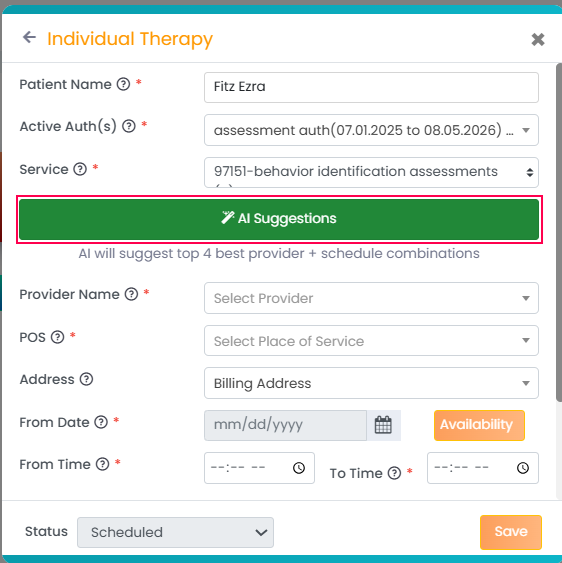
Review the four recommended provider and schedule combinations.
Click Apply This Option on your preferred suggestion.
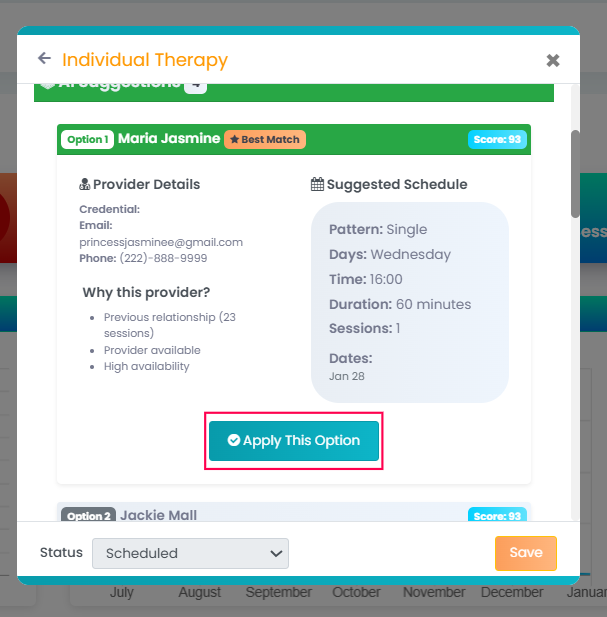
All displayed details will be automatically filled in. You can then complete any remaining information and create the session.
AI Voice Recorder and Summarizer
You can now use the built-in voice recorder and AI-powered summarization feature while adding session notes. These tools help you document sessions faster by converting spoken input into clear, professional summarized notes.
If you would like to enable this feature for your practice, please contact our support team at support@therapypms.com.
How to use
Log in to your TherapyPM account.
Navigate to the Appointment List View or open any appointment.
Access the Session Note section.
Choose to Add a new session note, edit an existing note, or copy a previous note.
Once the session note form is open:
- Any paragraph field within the form.

- Click the speaker (microphone) icon in the corner of the field.
- Enable the recorder and begin speaking your statement.
- The system will automatically transcribe your voice into text within the field.

Using AI to Summarize Your Notes
- Click the Summarize button within the field.

- The AI will analyze your transcribed text.
- A clear, professional summarized statement will be generated automatically.

Enhancement in Staff Credentials
We’ve introduced an enhancement to improve staff credential tracking.
You can now add Certification Number and License Number fields under the following sections:
Credentials
Clearance
Qualification
How to use
Log in to your TherapyPM account.
Navigate to the Staff Profile.
Go to the Credentials page.
Add a new record or edit an existing one.
You will now see the new Certification Number and License Number fields under:
Credentials
Clearance
Qualification
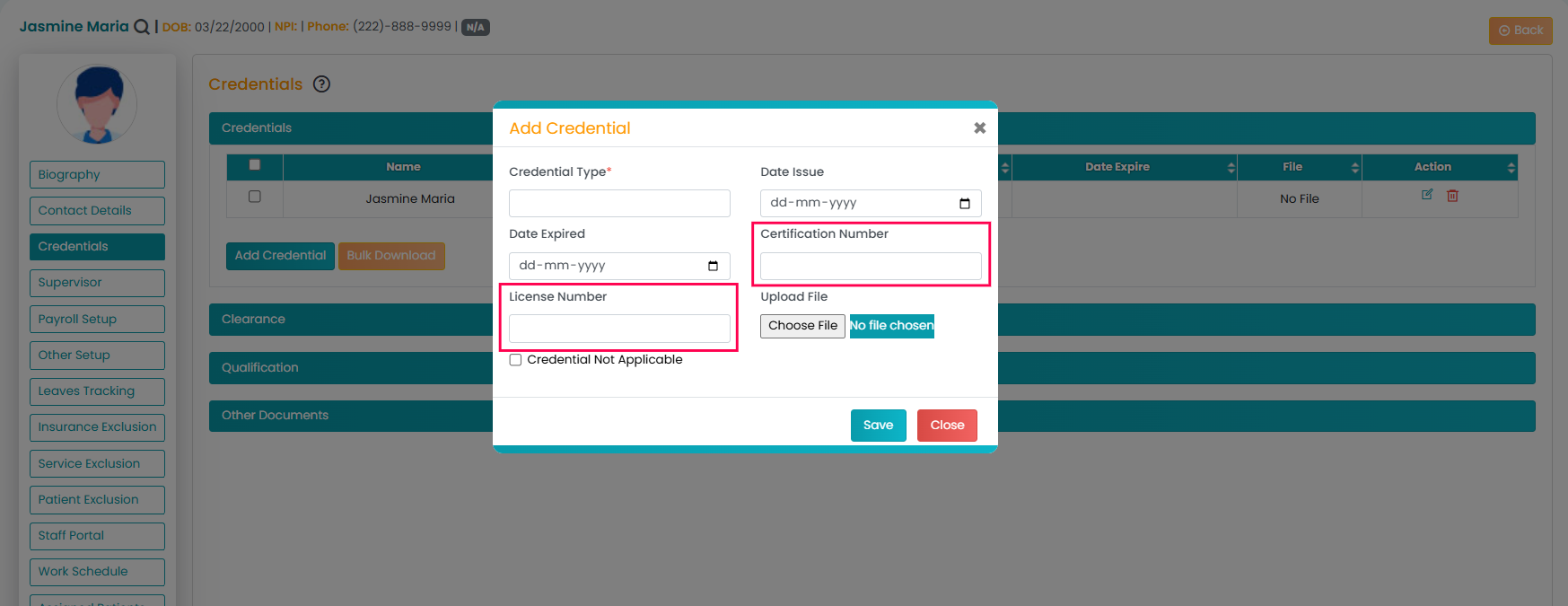
Make sure to save the details after updating.