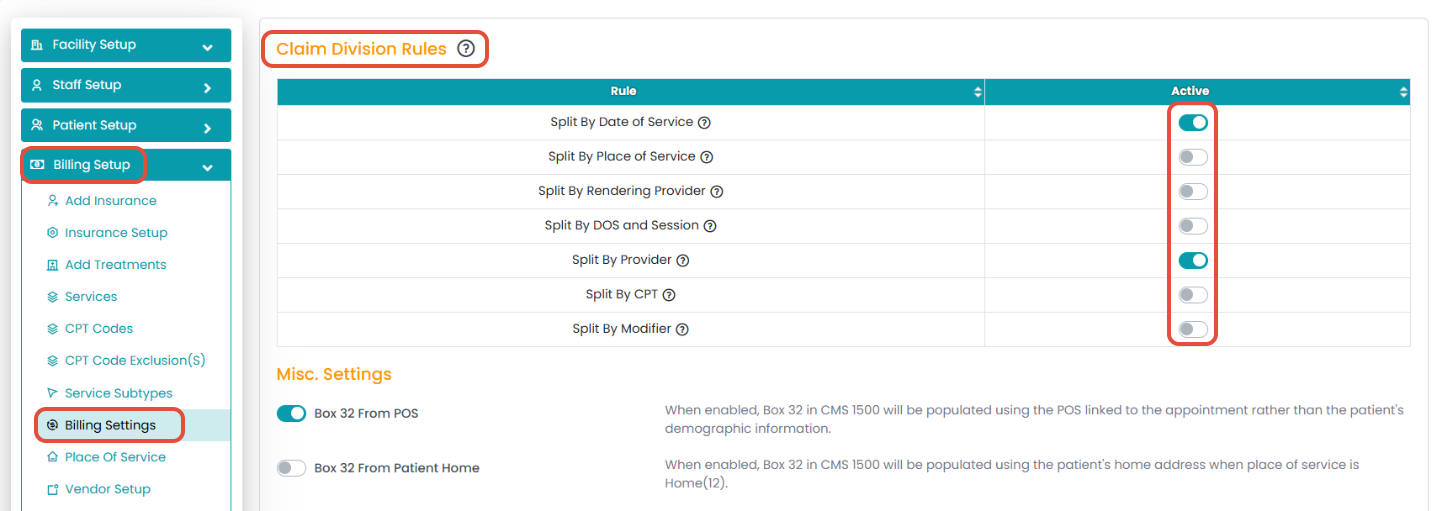
Claim Division Rules control how TherapyPM splits claims during billing.
Depending on your practice’s workflow, you can enable rules to split claims by:
Date of Service (DOS)
Place of Service (POS)
Rendering Provider
DOS + Session
Provider
CPT Code
Modifier
These rules help ensure claims are grouped or separated correctly before submission, reducing errors and improving billing accuracy.
Where to Find Claim Division Rules in TherapyPM?
- Navigate to Settings > Billing Setup > Billing Settings.
- Under the Claim Division Rules Section, you can toggle ON or OFF the rules accordingly.