
Video Walkthrough
View the below walkthrough video on Managing Patient in Provider Portal
The Punch-In module in TherapyPM allows providers to clock in at the start of their day and clock out when they finish work. The Current Status on the top denotes whether the provider is In/Out. This feature helps the organization keep accurate records of staff working hours.
Purpose of the Clock-In Feature:
- Record accurate work hours for payroll.
- Monitor the start and end times of sessions.
- Maintain compliance with timekeeping requirements for audits or record-keeping.
How to Punch IN/OUT?
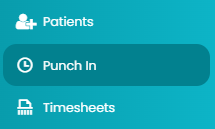
- Navigate to the Punch In module on the left.
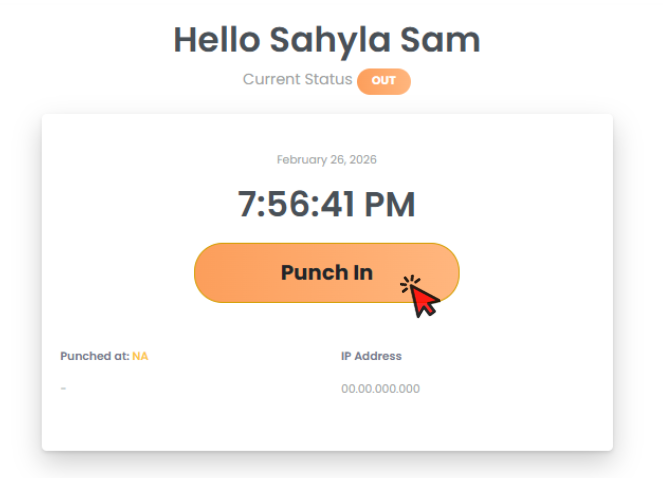
- Click on the Orange Punch In button to clock in. The system will start counting the time and also display the Current Status as IN.
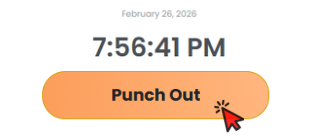
- To clock out, click on the same orange button, now showing Punch Out.
How to View/Manage Clock In Requests?
Choose Payroll Period in the drop-down under Clock In Requests (bottom left). It will generate a table.
The table shows the following information:
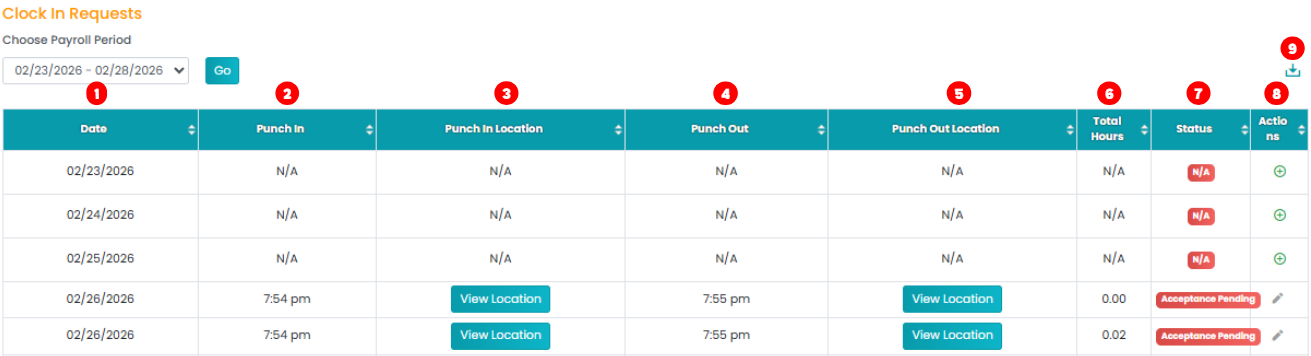
- Date: View dates for the selected Payroll Period.
- Punch In: View when the provider clocked in.
- Punch In Location: The location that you punch in.(Access View Location to open the map)
- Punch Out: View when the provider clocked out.
- Punch Out Location: The location that you punch out.(Access View Location to open the map)
- Total Hours: View how many hours the provider worked for.
- Status: View the status of acceptance approval for the work hours.
- Actions: For further actions, navigate the column:
- Edit Log Time: Click the Pencil icon to edit the log time.
- Plus Icon: Add a manual log.
- Download: Click on this icon on the top right of the list to download files in PDF or CSV format.