
This article shows you how to view your practice's AR ledger based on the aging claims - primary, secondary, and the amounts paid by the patients.
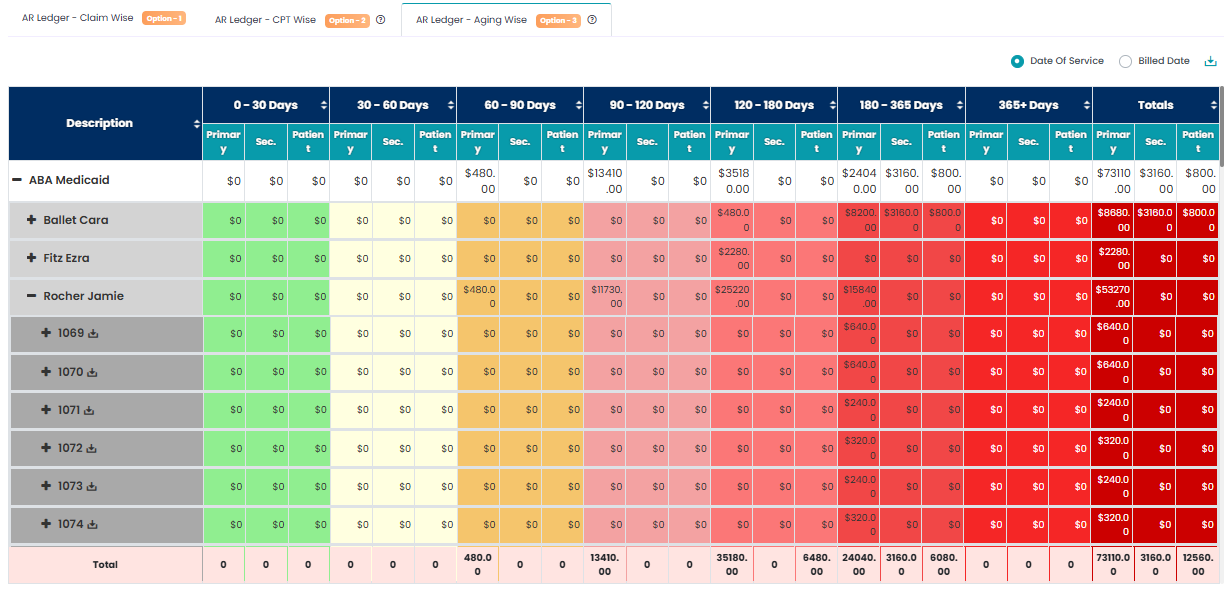
- Navigate to Billing > AR Ledger.
- Select the 3rd tab: AR Ledger - Aging Wise.
- The Aging Wise dashboard provides a dynamic table that organizes Accounts Receivable (AR) in a hierarchical structure:
- The report provides a detailed breakdown of claim data organized by Insurance, followed by Clients under each insurance category, and then by individual Claim Number for each client.
The columns display aging information categorized as:
0–30 Days
30–60 Days
60–90 Days
Continuing in ranges up to 365+ Days
The final column displays the Total Outstanding Amount to be paid.