
Video Walkthrough
View the below walkthrough video on Provider Dashboard
The Dashboard is a quick snapshot of all the practice management software modules. The graphs and reports are specially curated information that many practices will find helpful, some of which are actionable. See below for all the functions/ options available in the dashboard view.
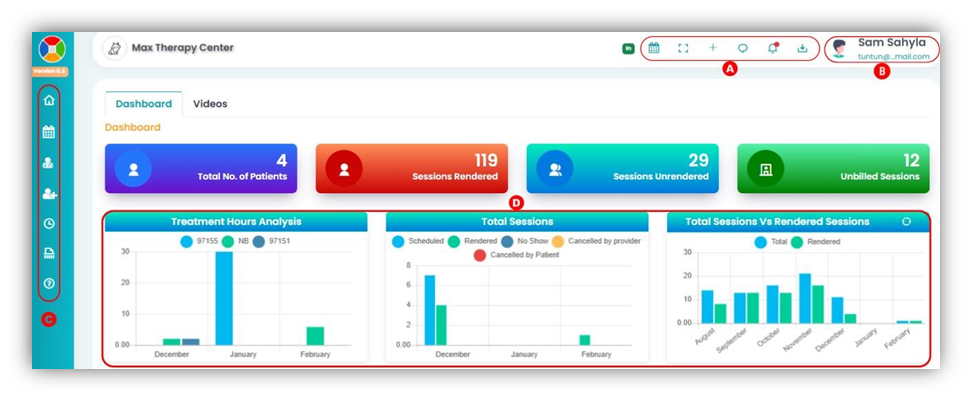
A. Quick Icon Tray
- In/ Out – Denotes whether the provider is working or not working.
- Provider calendar.
- Open the application in full screen.
- Create Patient/ Create Appointment button.
- Messenger – Access the in-application messenger to chat with patients and admin.
- Notification bell.
- Download Tray – Any report or document downloaded from TherapyPM will be available here.
B. View Provider Account C. Option Navigation
- Home
- Appointment – All the appointment scheduled for the provider displayed in a list view.
- Biographic – Add, view, and edit provider information.
- Patient(s) – Access patient information, Authorization (view only) and session notes.
- Punch In.
- Timesheets
- Help
D. Chart/ Graph
- Treatment hours analysis.
- Total Sessions.
- Total Sessions VS Rendered Sessions.
- Billable/ Non-billable hours.
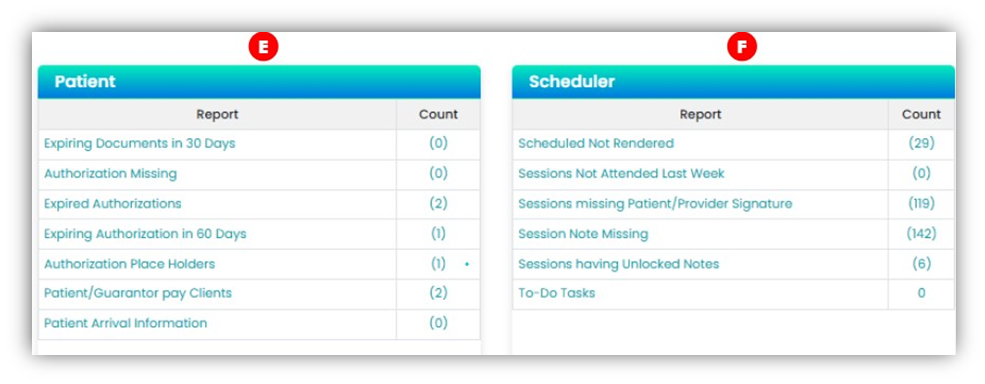
E. Reports – Patient
- Expiring documents in 30 days.
- Authorization missing.
- Expired authorizations.
- Expiring authorization in 60 days.
- Authorization place holder.
- Patient/ guarantor pay patients.
- Patient arrival information.
F. Reports – Scheduler
- Scheduled not rendered.
- Sessions not attended last week.
- Sessions missing patient/ provider signature.
- Session note missing.
- Sessions having unlocked notes.
- To-Do Tasks